Sponsored

Recent Blog Entries

  •   Understanding the World of Poker Online The popularity of digital card games has increased massively, and Poker Online has become one of the most played games across the world. Players enjoy poker online because it combines skill, strategy, and excitement, all accessible from anywhere at an...
  • The phrase bandar togel 4D has become increasingly popular in online discussions about number-based games. As digital entertainment continues to expand, traditional lottery-style activities are finding new life through online platforms. Bandar togel 4D represents a modern interpretation of classic n...
  • The expansion of digital entertainment has reshaped how people interact with traditional games, and togel online is a clear example of this transformation. Once limited to offline participation and local communities, number-based prediction games have evolved into accessible online formats that reac...
View All

Sponsored

Show desktop icons in Windows 10

  • Show desktop icons in Windows 10

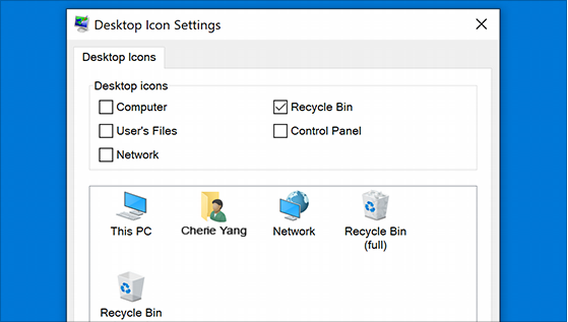
    The desktop icon may be hidden. To view it, right-click on the desktop, select View, and then select Show Desktop Icon. To add desktop icons like This PC, Recycle Bin, more: 

    1. Click the start button and then select Settings > Personalization > Themes.
    2. Under Themes > Related Settings, select Desktop Icon Settings.
    3. Select the icons you want to put on the desktop, then apply and click OK.
           

    1. Note. If you are in tablet mode, the desktop icons may not display correctly. You can find the program by searching for the program's name in File Explorer. To turn off tablet mode, select Action Center on the taskbar (next to date and time), and then select tablet mode to turn it on or off.

    Open Personalization settings

Sponsored

Sponsors