Sponsored

Recent Blog Entries

  • The expansion of digital entertainment has reshaped how people interact with traditional games, and togel online is a clear example of this transformation. Once limited to offline participation and local communities, number-based prediction games have evolved into accessible online formats that reac...
  •   In the world of interior design, the right lighting does more than just illuminate a room; it defines the atmosphere. The wagon wheel chandelier with glass shades is a masterclass in this balance, offering a sophisticated twist on a classic rustic silhouette. By combining the rugged, circula...
  • The online gaming world has seen a surge in interest for platforms that deliver both excitement and rewarding gameplay. Among them, SLOTO89 slot gacor has emerged as a popular choice for slot enthusiasts. The term “gacor” comes from Indonesian slang, meaning “active” or &ldqu...
View All

Sponsored

Show desktop icons in Windows 10

  • Show desktop icons in Windows 10

    The desktop icon may be hidden. To view it, right-click on the desktop, select View, and then select Show Desktop Icon. To add desktop icons like This PC, Recycle Bin, more: 

    1. Click the start button and then select Settings > Personalization > Themes.
    2. Under Themes > Related Settings, select Desktop Icon Settings.
    3. Select the icons you want to put on the desktop, then apply and click OK.
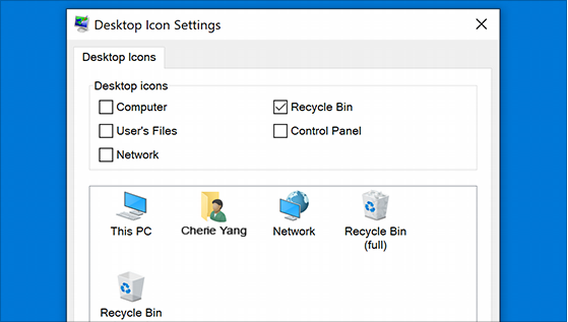
           

    1. Note. If you are in tablet mode, the desktop icons may not display correctly. You can find the program by searching for the program's name in File Explorer. To turn off tablet mode, select Action Center on the taskbar (next to date and time), and then select tablet mode to turn it on or off.

    Open Personalization settings

Sponsored

Sponsors