


A new updated privacy policy has landed Facebook-owned WhatsApp in deep water as many users grow increasingly suspicious of their privacy on the app. As a result, many WhatsApp users are migrating over to rival apps that need not share their data with a parent app like Facebook. One such popular app is Signal.
After a sudden rise in downloads made Signal the most downloaded App Store app in India, many new users are looking at settling into the new application and bringing their friends and family over. While making your own Signal account is quite easy, what could be troublesome is adding all your friends and family members in their respective groups one by one. Signal, however, has a neat little solution for WhatsApp migrants.
How to recreate your WhatsApp groups on Signal easily
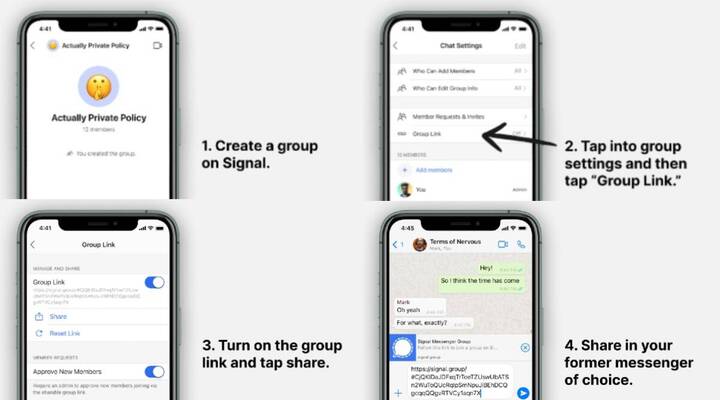
Step 1: Create a group on Signal
The first step to get your existing WhatsApp group on Signal is to create a new group on the app. You will have to add at least one member manually to create the group. Give the new group a name of your choice and add a picture if you want.
Step 2: Get the group invite link
Once the group has been created, head over to the group settings tab and choose ‘Group Link’. Turn on the Group Link toggle and get the shareable invite link.
Step 3: Share the invite link
Once you have received a group invite link, you can share it in your previous WhatsApp groups so that users can directly join themselves in your newly created Signal group. This eliminates the need for the admin to find and add users one-by-one manually.


Comments